


My Aurora Forecast & Alerts
4.7873.00 Reviews
App Specs
- Version
- 26.7.0
- Updated On
- License
- Free
- Downloads
- 5,000,000+
- Developer
- JRustonApps B.V.
- Categories
- Weather
- Platform
- Android, iOS
Screenshots
 Analysis by AppCompare
I treat aurora watching as a mix of patience, weather luck, and being ready to leave when conditions look promising. My Aurora Forecast & Alerts is built for that particular kind of night: it brings aurora-focused information together so I can check the outlook instead of relying on a general weather app alone. It’s most useful as a planning aid, not a promise that the lights will appear above my chosen spot.
That distinction matters. A forecast can help me decide whether to stay up or make the drive, but the actual view still depends on conditions outside the app’s control. I would use it to improve my chances and make a better-informed plan, while keeping expectations flexible.
When an internet connection matters
A connected phone is important when I’m checking changing forecasts, refreshing location-specific information, or waiting for an alert. Those are the moments when a weak signal can interrupt the experience: a screen may take longer to update, or I may not feel confident that I’m looking at the latest conditions. The app is more valuable when I check it before leaving home, while I still have reliable service, rather than assuming everything will refresh smoothly from a remote viewing spot.
I’d also treat an alert as a prompt to check the situation, not an automatic instruction to head out. A notification can arrive while I’m indoors, at work, or far from a dark-sky location. Before making a late-night trip, I would open the current forecast and weather information again, consider the drive, and decide whether the sky and timing make the outing worthwhile.
Features that Make the Aurora Hunt Easy
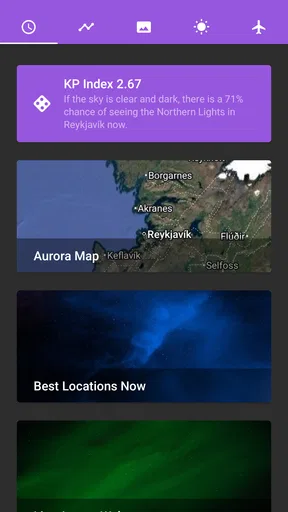
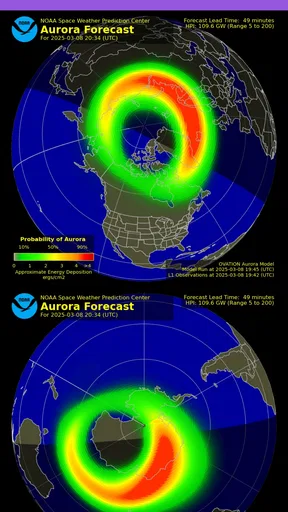
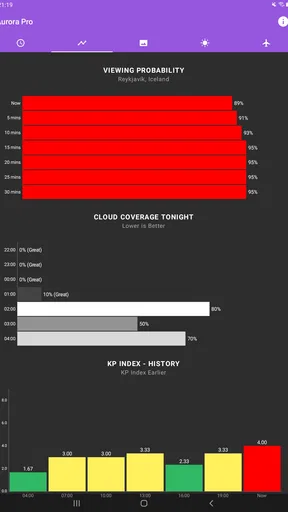
First off, My Aurora Forecast & Alerts packs a punch with its user-friendly interface. The app is designed with simplicity in mind, making it easy for both beginners and seasoned aurora chasers to navigate. When you open the app, you'll be greeted with a clean dashboard that provides essential information like the current KP index, which indicates the geomagnetic activity level – pretty much the lifeblood of any aurora sighting plan.
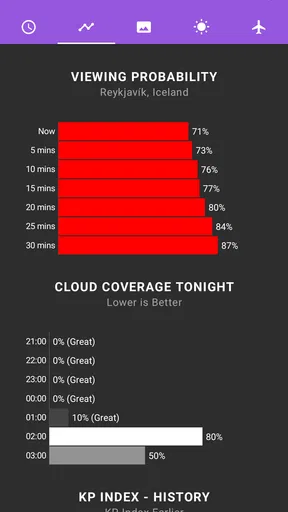
One of the standout features is the app's forecast capability. It offers short-term and long-term forecasts, giving you a heads-up on when and where the auroras are likely to appear. You can also get alerts, so there’s no more missing out on a spectacular show because you were busy or asleep. Just imagine getting a nudge from your phone, grabbing your coat, and heading out to witness the magic!
Location-Based Accuracy
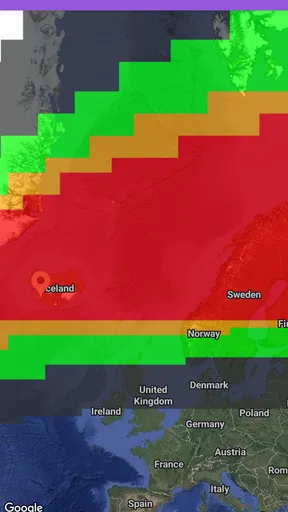
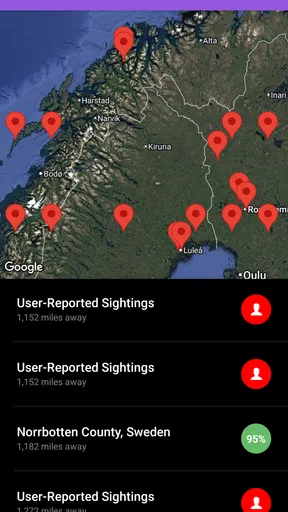
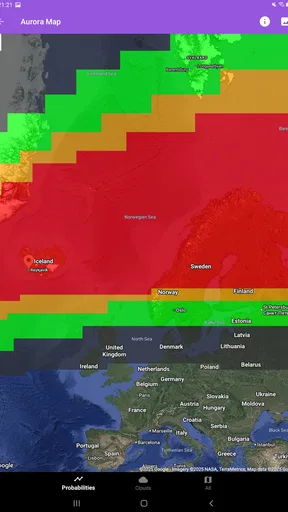
Another cool aspect of this app is its location-based services. It uses your GPS to provide real-time data tailored to your specific location. This ensures that the information is relevant and accurate, which is crucial when you're planning to step out into the cold night. Plus, the app has a nifty map feature that highlights the best viewing spots, so you won’t have to guess where to go.
Worth Reading Before You Choose

Flipboard Shows What News Apps Must Do Beyond the Feed

Switching to Android Auto Means Rethinking Your Driving Routine

Google Calendar Makes a Crowded Week Easier to Manage

Ludo King Makes the Most of the Minutes Between Plans

Baby Panda World Brings Quick Play to Modern Phones, but Its Game Library Feels Busy

ESPN’s Live Game View Makes Following Close Games Easier
And let's not forget about the weather updates. Nothing’s worse than getting pumped for an aurora sighting only to be thwarted by clouds. With integrated weather data, you’ll know in advance if the skies will be clear enough for a good view.
Planning a night around the forecast
For me, the most practical workflow is to check the longer-range view when deciding which evening might be worth keeping open, then return closer to the time for the short-term outlook. That way, I’m not treating an early forecast as a fixed appointment. On the day itself, I can compare the local conditions with the map and weather view, then choose whether to stay near home or travel to a darker place.
Here’s a realistic example: if I have work the next morning, I might check the outlook after dinner and set a personal cutoff for how far I’m willing to drive. If the forecast looks promising, I can prepare warm clothes and a charged phone before heading out; if clouds or a poor local outlook make the trip less appealing, I can avoid turning a hopeful forecast into a long, cold wait. The app helps organize that decision, but it cannot make the trade-off for me.
Saving favorite locations is useful beyond convenience. I’d keep separate places for a quick local check and a more distant dark-sky option, then compare them when the forecast becomes interesting. That small habit makes it easier to weigh travel against the possibility of clearer skies instead of choosing a destination in a rush.
Community and Sharing
What’s the fun in witnessing an aurora if you can’t brag a little, right? The app makes sharing your experiences a breeze. You can easily post your sightings on social media directly from the app, making it a cinch to keep your friends and followers in the loop. Plus, there’s a community feature where you can connect with other aurora enthusiasts. Share tips, stories, and maybe even plan a group outing!
Sharing is not just limited to social media. The app also lets you save your favorite locations and settings, so you can quickly pull them up later. This is especially useful if you have a few top-secret spots you like to visit regularly.
Using it while you’re out
Once I leave a strong-coverage area, I’d avoid making the trip depend on repeatedly refreshing the app. Checking the forecast and saving the places I care about before departure gives me a clearer plan if reception becomes unreliable. I’d also keep the phone’s battery in mind: a cold night, screen use, location services, and checking updates can all make a phone less comfortable to rely on for hours. A separate plan for directions and a sensible return route are still important; an aurora forecast is not a substitute for either.
The map is helpful for deciding where to look, but I wouldn’t assume that a highlighted place is automatically safe, accessible, or suitable at night. I’d check the route and local access for myself, avoid stopping somewhere unsafe just to get a better view, and tell someone where I’m going if I’m heading out alone. That’s a practical limit of any location tool: useful guidance still needs sound judgment on the ground.
Where it fits among weather apps
A general weather app is usually the better choice when I mainly need everyday forecasts, severe-weather notices, or a broad view of the week. This app has a narrower purpose: it brings aurora-oriented forecasting, location, and viewing considerations into one place. I wouldn’t replace my regular weather app with it, but I would use the two together when planning a potential northern-lights outing.
It also suits a different need from simply checking a map or a social feed. A map can help with geography, and posts from other observers can offer local context, but neither alone gives me the same focused planning flow. The trade-off is that a dedicated aurora app is only especially useful when I care about seeing the aurora; if I rarely travel or look up for it, a broad weather tool may be enough.
A Few Things to Keep in Mind
Like any app, it's not without its quirks. While the interface is generally smooth, there are occasional lags when updating data in areas with weak internet connections. It’s not a deal-breaker, but something to be aware of if you’re in a remote location.
For that reason, I’d make a simple recovery routine part of the plan: check the latest information before leaving, try again when I have a better connection if an update stalls, and avoid interpreting an old screen as a live reading. If the app is slow while I’m already out, waiting for a refresh in a poor-signal spot may be less useful than sticking with the plan I made while connected. Connectivity affects how comfortably I can use the changing information, so it is worth considering before choosing a remote destination.
The app is a better fit for curious sky watchers who are willing to check conditions and stay flexible than for someone who expects a guaranteed sighting or needs a complete general-purpose weather service. It can also be less convenient for anyone who plans to spend the whole evening somewhere with unreliable reception and has not checked the outlook beforehand. For a casual first attempt, I’d start with nearby viewing options and use the forecasts as guidance rather than making an expensive or exhausting trip on a single alert.
Also, while the app offers a free version, some features are locked behind a paywall. If you’re serious about aurora chasing, you might find the premium version worth the investment. But for casual users, the free version offers plenty to get you started.
The practical question is whether I need more than the free starting point. If I’m only checking occasional forecasts, I’d begin without paying and see whether the available tools fit my routine. Someone who follows aurora conditions often may value additional options enough to consider an upgrade, but I would first decide which features I actually use rather than paying based on enthusiasm alone.
JRustonApps B.V. publishes this free weather app, which is rated for Everyone. It has a 4.7 average from around 54,000 ratings and more than 5 million installs, a sign that it has found a sizeable audience among people interested in the northern lights. Version 26.6.0 is the current release, and the app first appeared on February 18, 2016; it requires Android 7.0 or later.
Final Thoughts
All in all, My Aurora Forecast & Alerts is a solid tool for anyone keen on catching the northern lights. Its intuitive design, combined with accurate forecasts and alerts, makes it a must-have for both newbies and veteran sky watchers. While it has a few minor hiccups, the pros far outweigh the cons.
So, next time you feel the itch to chase the aurora, grab this app, bundle up, and head out. Who knows? You might just catch one of nature’s most breathtaking shows. And hey, don’t forget to share those pics!
My own verdict is a little more practical: I’d install it if aurora watching is something I actively plan for, especially because forecasts, alerts, location details, and weather context can help me decide when an outing is worth the effort. I wouldn’t rely on it as the only tool for a remote night, and I’d check the latest information while connected before setting off. Used that way, it is a focused companion for making a better-informed attempt, not a guarantee from the sky.
Pros
- User-friendly interface for easy navigation.
- Accurate and timely aurora forecasts.
- Supports global aurora viewing locations.
- Customizable alerts for specific regions.
- Informative aurora activity maps.
Cons
- Requires internet for real-time updates.
- Ads can be intrusive at times.
- Limited offline features.
- Battery usage can be high with alerts.
- Some features require in-app purchases.
FAQs for My Aurora Forecast & Alerts
What features does My Aurora Forecast & Alerts offer?
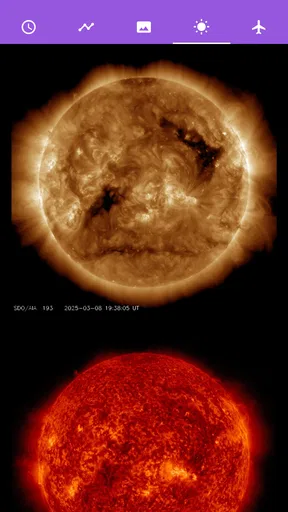
My Aurora Forecast & Alerts provides users with real-time aurora borealis predictions, customizable alerts, and a detailed forecast map. It includes information on solar wind activity, KP index predictions, and historical data to help users plan the best time and location to view the Northern Lights. The app also supports multiple languages and offers a sleek, user-friendly interface.
How accurate are the aurora forecasts in the app?
The app uses data from weather satellites and space weather agencies to provide highly accurate aurora predictions. It incorporates real-time solar wind metrics and geomagnetic activity to offer precise forecasts. While no app can guarantee 100% accuracy due to the complex nature of auroras, My Aurora Forecast & Alerts is frequently updated to ensure users receive the most reliable information available.
Can I receive notifications for aurora sightings near my location?
Yes, My Aurora Forecast & Alerts allows users to set up customizable alerts for aurora sightings. You can configure notifications based on your location and preferred KP index threshold. This feature ensures that you won't miss an opportunity to see the Northern Lights, as the app will alert you when conditions are optimal in your area.
Is My Aurora Forecast & Alerts easy to use for beginners?
Absolutely, the app is designed with an intuitive interface that is easy for beginners to navigate. It offers clear instructions and helpful tips to guide new users in understanding aurora forecasts. The app simplifies complex data into user-friendly visuals and straightforward information, making it accessible to both novices and experienced aurora enthusiasts.
Does My Aurora Forecast & Alerts require an internet connection?
To provide the most up-to-date and accurate aurora forecasts, the app does require an internet connection. It needs to access real-time data from satellites and space weather sources. However, once the data is loaded, you can view it offline until the next update, making it convenient for use in areas with limited connectivity.


